Spark 2.2.0: New Imputer to replace missing values

With the release of Spark 2.2.0, we can now use the newly implemented Imputer to replace missing values in our dataset. However, it only supports mean and median as the imputation strategies currently but not the most frequent. The default strategy is mean. (Note: scikit-learn provides all three different strategies).

See the Imputer class and the associated Jira ticket below
https://github.com/apache/spark/blob/master/mllib/src/main/scala/org/apache/spark/ml/feature/Imputer.scala

https://issues.apache.org/jira/browse/SPARK-13568

Example usage using Zillow Price Kaggle dataset:


val imputer = new Imputer()
imputer.setInputCols(Array("bedroomcnt", "bathroomcnt", "roomcnt", "calculatedfinishedsquarefeet", "taxamount", "taxvaluedollarcnt", "landtaxvaluedollarcnt", "structuretaxvaluedollarcnt")) 

imputer.setOutputCols(Array("bedroomcnt_out", "bathroomcnt_out", "roomcnt_out", "calculatedfinishedsquarefeet_out", "taxamount_out", "taxvaluedollarcnt_out", "landtaxvaluedollarcnt_out", "structuretaxvaluedollarcnt_out"))
   

However, I ran into this issue, it can’t handle column values of integer type. See this Jira ticket.

https://issues.apache.org/jira/browse/SPARK-20604

The good news is a pull request was created to fix the issue by converting integer type to double type during imputation. See the pull request below.

https://github.com/apache/spark/pull/17864

StringIndexer transform fails when column contains nulls

If you run into NullPointerException when using StringIndexer in Spark version < 2.2.0, this means that your input column contains null values. You would have to remove/impute these null values before using StringIndexer. See ticket below. Good news is this issue was fixed in Spark version 2.2.0

https://issues.apache.org/jira/browse/SPARK-11569

With the fix, we can specify how StringIndexer should handle null values, three different strategies are available as below.

handleInvalid=error: Throw an exception as before
handleInvalid=skip: Skip null values as well as unseen labels
handleInvalid=keep: Give null values an additional index as well as unseen labels

val codeIndexer = new StringIndexer().setInputCol("originalCode").setOutputCol("originalCodeCategory")
codeIndexer.setHandleInvalid("keep")


Zillow Price Kaggle Competition Part 2

From my last blog, I calculated the missing value percentage for every columns in the data. Next thing to do is to perform imputation of missing values in selected columns before model training.

However, I am going to skip doing in depth data cleaning and feature selection eg. removing outliers and calculating correlations between features, etc. I will do that in the next blog 😉

Instead I am going to use  the following features to build a model. These columns have low missing value percentage.

"bedroomcnt"
"bathroomcnt"
"roomcnt"
"taxamount"
"taxvaluedollarcnt"
"lotsizesquarefeet"
"finishedsquarefeet12"
"latitude"
"longitude"

I replaced missing values in bedroomcnt with 3 and bathroomcnt with 2 (use most frequent value) and drop any row that has any missing values in the other columns.

In this experiment, I used Spark to train a Gradient Boost Tree Regression model. I built a Spark ML pipeline to perform hyperparameter tuning of GBT. Basically, it will test a grid of different hyperparameters and choose the best parameters based on the evaluation metric, RMSE.

val paramGrid = new ParamGridBuilder()
      .addGrid(gbt.maxDepth, Array(2,5))
      .addGrid(gbt.maxIter, Array(50,100))
      .build()


Screen Shot 2017-08-07 at 12.37.39 AM

Screen Shot 2017-08-07 at 12.42.14 AM

Next I will need to go back to data cleaning and feature selection to choose better/more features to improve the model.

Zillow Prize Kaggle Competition: Exploratory Analysis Part 1

You can download the Zillow Price Kaggle datasets from https://www.kaggle.com/c/zillow-prize-1
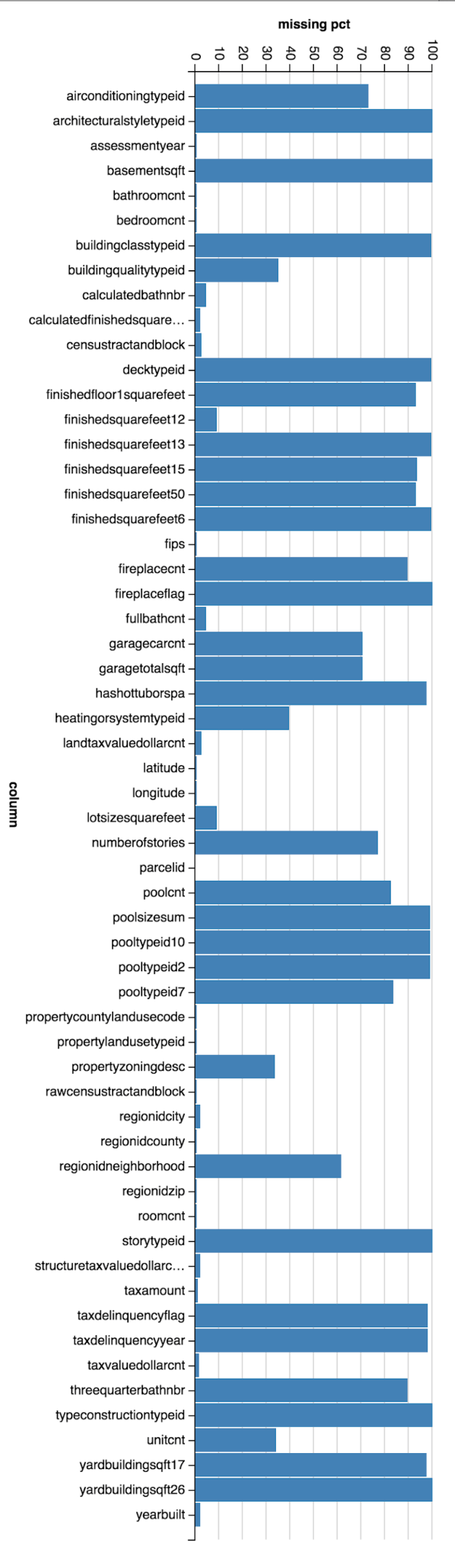
For this exploratory study of property dataset, I used Spark to calculate the missing value percentage for each column. As you can see below, as many as 20 columns have greater than 90% null/empty values. Examples: storytypeid, basementsqft, yardbuildingsqft.

(Column Name, Missing Value Percentage)
(storytypeid,99.94559859467502)
(basementsqft,99.94546460106585)
(yardbuildingsqft26,99.91132972912857)
(fireplaceflag,99.82704774895761)
(architecturalstyletypeid,99.79696618369786)
(typeconstructiontypeid,99.7739862797244)
(finishedsquarefeet13,99.74300025760272)
(buildingclasstypeid,99.57694867743282)
(decktypeid,99.42731131438686)
(finishedsquarefeet6,99.26300165113625)
(poolsizesum,99.06338467186806)
(pooltypeid2,98.92553874642948)
(pooltypeid10,98.76260251767292)
(taxdelinquencyflag,98.10861320969296)
(taxdelinquencyyear,98.10854621288838)
(hashottuborspa,97.68814126410241)
(yardbuildingsqft17,97.30823588368953)
(finishedsquarefeet15,93.60857183916613)
(finishedfloor1squarefeet,93.20930438222749)
(finishedsquarefeet50,93.20930438222749)

(threequarterbathnbr,89.56085939481116)
(fireplacecnt,89.5271600021037)
(pooltypeid7,83.73789912090143)
(poolcnt,82.66343786733091)
(numberofstories,77.15177824593657)
(airconditioningtypeid,72.81541006901676)
(garagecarcnt,70.41196670124819)
(garagetotalsqft,70.41196670124819)
(regionidneighborhood,61.26238059075773)
(heatingorsystemtypeid,39.488452598253325)
(buildingqualitytypeid,35.06374913448503)
(unitcnt,33.75724444822604)
(propertyzoningdesc,33.71908976801352)
(lotsizesquarefeet,9.248875374888994)
(finishedsquarefeet12,9.24666448033761)
(calculatedbathnbr,4.31834603648579)
(fullbathcnt,4.31834603648579)
(censustractandblock,2.5166009707167016)
(landtaxvaluedollarcnt,2.268947282559358)
(regionidcity,2.10520709214774)
(yearbuilt,2.0074922526570096)
(calculatedfinishedsquarefeet,1.8613387234495853)
(structuretaxvaluedollarcnt,1.8418091549123563)
(taxvaluedollarcnt,1.4253570175970458)
(taxamount,1.0468250716782062)
(regionidzip,0.46830766406596236)
(propertycountylandusecode,0.4112598849597868)
(roomcnt,0.3843941663202374)
(bathroomcnt,0.38395868709041925)
(bedroomcnt,0.3835567062628948)
(assessmentyear,0.38318822383766404)
(fips,0.38312122703307666)
(latitude,0.38312122703307666)
(longitude,0.38312122703307666)
(propertylandusetypeid,0.38312122703307666)
(rawcensustractandblock,0.38312122703307666)
(regionidcounty,0.38312122703307666)
(parcelid,0.0)
Screen Shot 2017-08-05 at 12.24.07 AM

Now I have identified the good columns (italics bold, less than 10% empty values) and bad columns. The next step is to determine if we can apply some sorts of missing values imputation to any of those problematic columns.

A few missing value imputation techniques are available, such as using mean, median, or most frequent value as replacement value.

Deprecated functions in org.apache.spark.sql. functions in Spark 2.0

I just moved some of my spark codes from 1.6.0 to 2.2.0 and discovered that some functions in org.apache.spark.sql.functions._ are being replaced/renamed.

To name a few, see below

1) rowNumber() is replaced by row_number()

import org.apache.spark.sql.functions._
/**
* @group window_funcs
* @deprecated As of 1.6.0, replaced by `row_number`. This will be removed in Spark 2.0.
*/
@deprecated("Use row_number. This will be removed in Spark 2.0.", "1.6.0")
def rowNumber(): Column = row_number()

2) isNaN is replaced by isnan

/**
   * @group normal_funcs
   * @deprecated As of 1.6.0, replaced by `isnan`. This will be removed in Spark 2.0.
   */
  @deprecated("Use isnan. This will be removed in Spark 2.0.", "1.6.0")
  def isNaN(e: Column): Column = isnan(e)

3) inputFileName() is replaced by input_file_name

/**
   * @group normal_funcs
   * @deprecated As of 1.6.0, replaced by `input_file_name`. This will be removed in Spark 2.0.
   */
  @deprecated("Use input_file_name. This will be removed in Spark 2.0.", "1.6.0")
  def inputFileName(): Column = input_file_name()

To get the full list of all the replaced/renamed functions, refer to this code
https://github.com/apache/spark/blob/branch-1.6/sql/core/src/main/scala/org/apache/spark/sql/functions.scala

InstaCart: Product Recommender

InstaCart has recently open sourced anonymized data on customer orders for its Kaggle competition. You can find out more info from the link below.

https://www.kaggle.com/c/instacart-market-basket-analysis

Previously, I did some data exploration to discover some interesting insights. See my previous blog post.

Next I would like to use their anonymized data to build a product recommender system. There are many approaches/strategies in product recommendations, eg. Most popular items, Also bought/viewed, Featured items, and etc. I am going to explore the most popular items approach and collaborative filtering (also bought) approach.

We can identify the top 5 popular items for each department and utilize them for most popular items recommendation. For example, the top 5 items for frozen department are Blueberries, Organic Broccoli Florets, Organic Whole Strawberries, Pipeapple Chunks, Frozen Organic Wild Blueberries.

Screen Shot 2017-07-10 at 10.51.55 PM

Next, I utilized Spark ALS algorithm to  build a collaborative filtering based recommender system.

Some stats about the data

Total user-product pair (rating): 1,384,617

Total users: 131,209

Total products: 39,123

Given the data, I splitted the data into train set (0.8) vs test set (0.2) randomly. This resulted in
Number of train elements: 1,107,353
Number of test elements: 277,264

Here are the parameters I used in ALS, rank = 10, lambda = 1, number of iterations = 10, 50, 60, 80

  • Number of iterations = 10,    RMSE = 0.9999895
  • Number of iterations = 50,    RMSE = 0.9999828
  • Number of iterations = 60,    RMSE = 0.9999875
  • Number of iterations = 80,    RMSE = 0.9999933

We can also try out different ranks in grid search.

Here are some recommendations suggested by ALS collaborative filtering algorithm (number of iterations =80, rank=10)

Given user 124383 Transaction History

+——-+———-+—–+———-+—————————+——–+————-+
|user_id|product_id|count|product_id|product_name |aisle_id|department_id|
+——-+———-+—–+———-+—————————+——–+————-+
|124383 |49478 |1 |49478 |Frozen Organic Strawberries|24 |4 |
|124383 |21903 |1 |21903 |Organic Baby Spinach |123 |4 |
|124383 |19508 |1 |19508 |Corn Tortillas |128 |3 |
|124383 |20114 |1 |20114 |Jalapeno Peppers |83 |4 |
|124383 |44142 |1 |44142 |Red Onion |83 |4 |
|124383 |20345 |1 |20345 |Thin Crust Pepperoni Pizza |79 |1 |
|124383 |27966 |1 |27966 |Organic Raspberries |123 |4 |
+——-+———-+—–+———-+—————————+——–+——————+

Here are the recommendations
+———-+————————————————————-+——–+————-+
|product_id|product_name |aisle_id|department_id|
+———-+————————————————————-+——–+——————+
|28717 |Sport Deluxe Adjustable Black Ankle Stabilizer |133 |11 |
|15372 |Meditating Cedarwood Mineral Bath |25 |11 |
|18962 |Arroz Calasparra Paella Rice |63 |9 |
|2528 |Cluckin’ Good Stew |40 |8 |
|21156 |Dreamy Cold Brew Concentrate |90 |7 |
|12841 |King Crab Legs |39 |12 |
|24862 |Old Indian Wild Cherry Bark Syrup |47 |11 |
|37535 |Voluminous Extra-Volume Collagen Mascara – Blackest Black 680|132 |11 |
|30847 |Wild Oregano Oil |47 |11 |
+———-+————————————————————-+——–+————-+


Instacart Data Insight

InstaCart has recently organized a Kaggle competition and published anonymized data on customer orders over time to predict which previously purchased products will be in a user’s next order. You can check out the link below.

https://www.kaggle.com/c/instacart-market-basket-analysis

First, I used Spark to analyze the data to uncover hidden insights.

We were given the departments data

Screen Shot 2017-07-05 at 10.04.34 PM

Products data

Screen Shot 2017-07-05 at 10.07.32 PM

Orders data

Screen Shot 2017-07-05 at 10.07.47 PM

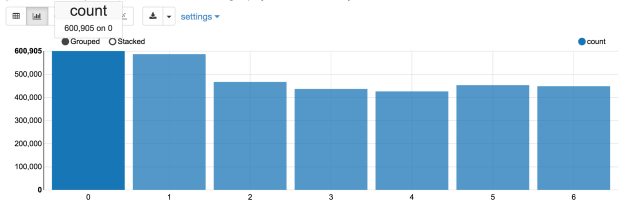
Lets find out which is the busiest day of the week. As it turns out, day 0 is the busiest day, with 600,905 orders followed by day 1 with 587478 orders. I would assume day 0 is Sunday and day 1 is Monday.

Screen Shot 2017-07-05 at 10.15.12 PM.png

Next, lets figure out which is the busiest hour in a day. It turns out 10 am is the busiest hour with 288,418 orders, followed by 11 am with 284,728 orders.

As you can see, Instacart customers like to shop from 11 am to 5 pm. It would be interesting to see the day of week + hour of day breakdown too.

Screen Shot 2017-07-05 at 10.18.24 PM

Here is the breakdown of popular hours for each day. 10 am dominates the top spot.

Screen Shot 2017-07-06 at 12.59.15 AM

Next lets figure out the top ten popular items among Instacart customers. Surprisingly, banana is the most popular item.

Screen Shot 2017-07-05 at 10.09.13 PM.png

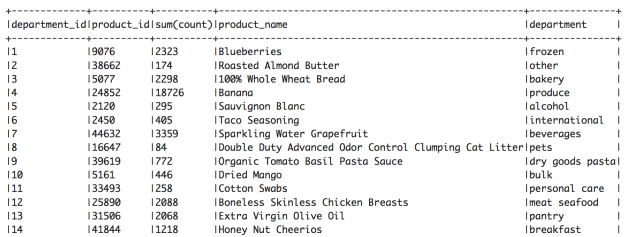
Lets find out the top item for each department. We can see that Blueberries is the most popular item for frozen department and Extra Virgin Olive Oil is the most popular item for pantry department. Some unexpected surprises are dried mango, cotton swabs, and honey nut cheerios.

Screen Shot 2017-07-10 at 10.18.57 PM

We are also interested in knowing the reorder interval, how many days since the prior order before making the next order.

Screen Shot 2017-07-05 at 11.47.04 PM.png

As we discovered, 30 days is the most frequent reorder interval. It looks like most of customers reorder once a month. On the other hand, 320,608 orders were placed after 7 days since the prior order. We can concluded that majority of customers reorder after 1 month or 1 week since the prior order.

Stay tuned for next blog on my study results at the individual user level.

Running Spark Job in AWS Data Pipeline

If you want to run Spark job in AWS data pipeline, add an EmrActivity and use command-runner.jar to submit the spark job.

In the Step field box of the EmrActivity node, enter the command as follows

command-runner.jar,spark-submit,--master,yarn-cluster,--deploy-mode,cluster,--class,com.yourcompany.yourpackage.YourClass,s3://PATH_TO_YOUR_JAR,YOUR_PROGRAM_ARGUMENT_1,YOUR_PROGRAM_ARGUMENT_2,YOUR_PROGRAM_ARGUMENT_3

Some useful resources
http://docs.aws.amazon.com/emr/latest/ReleaseGuide/emr-spark-submit-step.html
http://docs.aws.amazon.com/emr/latest/ReleaseGuide/emr-commandrunner.html

BLAS in MLlib

I was looking into BLAS.scala routines for MLlib’s vectors and matrices. It looks like Spark uses the F2jblas for level 1 routines.

https://github.com/apache/spark/blob/master/mllib-local/src/main/scala/org/apache/spark/ml/linalg/BLAS.scala

// For level-1 routines, we use Java implementation.
private def f2jBLAS: NetlibBLAS = {
  if (_f2jBLAS == null) {
    _f2jBLAS = new F2jBLAS
  }
  _f2jBLAS
}

Here are some great resources about different BLAS implementations
http://www.spark.tc/blas-libraries-in-mllib/

https://blog.cloudera.com/blog/2017/02/accelerating-apache-spark-mllib-with-intel-math-kernel-library-intel-mkl/

BLAS routines (Level 1,2,3)
http://www.netlib.org/blas/#_blas_routines

StackoverflowError when running ALS in Spark’s MLlib

If you ever encounter StackoverflowError when running ALS in Spark’s MLLib, the solution is to turn on checkpointing as follows

sc.setCheckpointDir(‘your_checkpointing_dir/’)

Check out the Jira ticket regarding the issue and pull request below

https://issues.apache.org/jira/browse/SPARK-1006

https://github.com/apache/spark/pull/5076