Here are some great materials for Logistic Regression with focus in the maximum likelihood estimation of the model
Author Archives: BigData Explorer
Log Structured Merge Tree (LSM Tree) in HBase
If you have ever worked with HBase, Cassandra, Google Big Table, LevelDB, you probably have heard about Log Structured Merge tree. LSM differentiates these no-sql variants from the majority of RDBMS which use B+ tree.
In HBase, the LSM tree data structure concept is materialized by the use of HLog, Memstores, and storefiles. The main idea of LSM is that data is first kept in memory cache, eg. Memstores in HBase. Each region server has multiple regions (HRegion). Each HRegion contains a section of data for a table. It has as many memstores as the number of column families for the table. HRegion keeps track of the total memstore size contributed by all these memstores. As you see in the following method in HRegion, after applying any mutation operations, it will check if the total memstore size exceeded the configured max flush size. If so, it will call the requestFlush() method. In the requestFlush() method, it basically delegates the call to the regionserver’s MemstoreFlusher
  /*

   * @param size

   * @return True if size is over the flush threshold

   */

  private boolean isFlushSize(final long size) {

    return size > this.memstoreFlushSize;

  }

 /**
   * Perform a batch of mutations.
   * It supports only Put and Delete mutations and will ignore other types passed.
   * @param batchOp contains the list of mutations
   * @return an array of OperationStatus which internally contains the
   *         OperationStatusCode and the exceptionMessage if any.
   * @throws IOException
   */
  OperationStatus[] batchMutate(BatchOperationInProgress<?> batchOp) throws IOException {
    boolean initialized = false;
    Operation op = batchOp.isInReplay() ? Operation.REPLAY_BATCH_MUTATE : Operation.BATCH_MUTATE;
    startRegionOperation(op);
    try {
      while (!batchOp.isDone()) {
        if (!batchOp.isInReplay()) {
          checkReadOnly();
        }
        checkResources();

        if (!initialized) {
          this.writeRequestsCount.add(batchOp.operations.length);
          if (!batchOp.isInReplay()) {
            doPreMutationHook(batchOp);
          }
          initialized = true;
        }
        long addedSize = doMiniBatchMutation(batchOp);
        long newSize = this.addAndGetGlobalMemstoreSize(addedSize);
        if (isFlushSize(newSize)) {
          requestFlush();
        }
      }
    } finally {
      closeRegionOperation(op);
    }
    return batchOp.retCodeDetails;
  }


  private void requestFlush() {

    if (this.rsServices == null) {

      return;

    }

    synchronized (writestate) {

      if (this.writestate.isFlushRequested()) {

        return;

      }

      writestate.flushRequested = true;

    }

    // Make request outside of synchronize block; HBASE-818.

    this.rsServices.getFlushRequester().requestFlush(this, false);

    if (LOG.isDebugEnabled()) {

      LOG.debug("Flush requested on " + this.getRegionInfo().getEncodedName());

    }

  }
HRegion loads up the configured max Memstore flush size.
This in memory cache has pre-configured max size. See the HRegion’s method below.
 void setHTableSpecificConf() {
    if (this.htableDescriptor == null) return;
    long flushSize = this.htableDescriptor.getMemStoreFlushSize();

    if (flushSize <= 0) {
      flushSize = conf.getLong(HConstants.HREGION_MEMSTORE_FLUSH_SIZE,
        HTableDescriptor.DEFAULT_MEMSTORE_FLUSH_SIZE);
    }
    this.memstoreFlushSize = flushSize;
    this.blockingMemStoreSize = this.memstoreFlushSize *
        conf.getLong(HConstants.HREGION_MEMSTORE_BLOCK_MULTIPLIER,
                HConstants.DEFAULT_HREGION_MEMSTORE_BLOCK_MULTIPLIER);
  }
As soon as it exceeds the max size, the data will be flushed to disk, as storefiles in HBase.
In addition, there is a configurable max limit of number of storefiles permitted in HBase. When the number of storefiles exceeds the allowable max limit, compaction will be triggered to merge and compact these storefiles into a bigger one. The main purpose of this compaction is to speed up the read path to reduce number of store files to be read.
Please check out this great paper of LSM tree
yarn rmadmin
Have you ever wondered what happened behind the scene when you execute
yarn rmadmin -refreshNodes
https://github.com/apache/hadoop/blob/trunk/hadoop-yarn-project/hadoop-yarn/bin/yarn
The above is the shell script that runs when you call the yarn command
rmadmin)
    CLASS='org.apache.hadoop.yarn.client.cli.RMAdminCLI'
    hadoop_debug "Append YARN_CLIENT_OPTS onto HADOOP_OPTS"
    HADOOP_OPTS="${HADOOP_OPTS} ${YARN_CLIENT_OPTS}"
As you can seen above, the shell script invokes the class org.apache.hadoop.yarn.client.cli.RMAdminCLI when we issue the command yarn rmadmin -refreshNodes
Here is the refreshNodes() method in the class org.apache.hadoop.yarn.client.cli.RMAdminCLI. It uses the ClientRMProxy to make RPC call to the ResourceManager refreshNodes() method.
private int refreshNodes() throws IOException, YarnException {
    // Refresh the nodes
    ResourceManagerAdministrationProtocol adminProtocol = createAdminProtocol();
    RefreshNodesRequest request = RefreshNodesRequest
        .newInstance(DecommissionType.NORMAL);
    adminProtocol.refreshNodes(request);
    return 0;
  }


 protected ResourceManagerAdministrationProtocol createAdminProtocol()
      throws IOException {
    // Get the current configuration
    final YarnConfiguration conf = new YarnConfiguration(getConf());
    return ClientRMProxy.createRMProxy(conf,
        ResourceManagerAdministrationProtocol.class);
  }
YARN NodesListManager
In a YARN cluster, you might encounter some strangler or problematic nodes occasionally that you would like to decommission from being used in your MR jobs.
You can add those nodes in the exclude file you defined in the yarn-site.xml. The property used to specify the exclude file is called yarn.resourcemanager.nodes.exclude-path
Then, you can execute the command to dynamically remove the nodes from the cluster
yarn rmadmin -refreshNodes
Behind the scene, if you look at the ResourceManager class, it has an instance of NodesListManager. This service class is responsible of parsing the exclude file and use the nodes list to check against any node manager request for registration.
public class ResourceManager extends CompositeService implements Recoverable {

  /**
   * Priority of the ResourceManager shutdown hook.
   */
  public static final int SHUTDOWN_HOOK_PRIORITY = 30;

  private static final Log LOG = LogFactory.getLog(ResourceManager.class);
  private static long clusterTimeStamp = System.currentTimeMillis();

  /**
   * "Always On" services. Services that need to run always irrespective of
   * the HA state of the RM.
   */
  @VisibleForTesting
  protected RMContextImpl rmContext;
  private Dispatcher rmDispatcher;
  @VisibleForTesting
  protected AdminService adminService;

  /**
   * "Active" services. Services that need to run only on the Active RM.
   * These services are managed (initialized, started, stopped) by the
   * {@link CompositeService} RMActiveServices.
   *
   * RM is active when (1) HA is disabled, or (2) HA is enabled and the RM is
   * in Active state.
   */
  protected RMActiveServices activeServices;
  protected RMSecretManagerService rmSecretManagerService;

  protected ResourceScheduler scheduler;
  protected ReservationSystem reservationSystem;
  private ClientRMService clientRM;
  protected ApplicationMasterService masterService;
  protected NMLivelinessMonitor nmLivelinessMonitor;
  protected NodesListManager nodesListManager;
If you check the NodesListManager, there is a refreshNodes method which reads the configuration file and then read the exclude nodes in the specified exclude file.
Stay tuned for more infos.
 public void refreshNodes(Configuration yarnConf) throws IOException,
      YarnException {
    refreshHostsReader(yarnConf);

    for (NodeId nodeId: rmContext.getRMNodes().keySet()) {
      if (!isValidNode(nodeId.getHost())) {
        this.rmContext.getDispatcher().getEventHandler().handle(
            new RMNodeEvent(nodeId, RMNodeEventType.DECOMMISSION));
      }
    }
  }

private void refreshHostsReader(Configuration yarnConf) throws IOException,
      YarnException {
    synchronized (hostsReader) {
      if (null == yarnConf) {
        yarnConf = new YarnConfiguration();
      }
      includesFile =
          yarnConf.get(YarnConfiguration.RM_NODES_INCLUDE_FILE_PATH,
              YarnConfiguration.DEFAULT_RM_NODES_INCLUDE_FILE_PATH);
      excludesFile =
          yarnConf.get(YarnConfiguration.RM_NODES_EXCLUDE_FILE_PATH,
              YarnConfiguration.DEFAULT_RM_NODES_EXCLUDE_FILE_PATH);
      hostsReader.updateFileNames(includesFile, excludesFile);
      hostsReader.refresh(
          includesFile.isEmpty() ? null : this.rmContext
              .getConfigurationProvider().getConfigurationInputStream(
                  this.conf, includesFile), excludesFile.isEmpty() ? null
              : this.rmContext.getConfigurationProvider()
                  .getConfigurationInputStream(this.conf, excludesFile));
      printConfiguredHosts();
    }
  }
Great paper on Large-scale L-BFGS using MapReduce
This is a great paper about implementing an efficient large scale parallel version of L-BFGS algorithm in MapReduce.
http://papers.nips.cc/paper/5333-large-scale-l-bfgs-using-mapreduce.pdf
Great tutorial on maximum likelihood estimation
This is an easy and well written tutorial for those who want to get a basic understanding of maximum likelihood estimation. Enjoy !
Tutorial on maximum likelihood estimation
Here are some additional papers
OLAP in Big Data
Almost any big data pipeline has an aggregation processing step for analyzing multidimensional data. For example: in sales dataset, we have the following
<year, month, day, hour, minute, second, city, state, country, sales>
where <year, month, day> are attributes of the date dimension and <hour, minute, second> are attributes for the time dimension. These are so called the temporal dimensions.
<city, state, country> are attributes of the location dimension.
In OLAP data tube terminology, cube group denotes an actual group belonging to the cube region defined by a certain dimension attributes. Eg. one could have the following cube region <search_topic, device_type, *, *> with the corresponding actual cube groups <technology, iPhone, *, *>, <technology, android, *, *>, <news, iPhone, *, *> etc.
Note, * represents the all category which includes every attributes in that dimension.
Many pipelines are interested in computing aggregate measures SUM, REACH, TOP K over all possible aggregate/cube groups defined by the above dimensions. Eg. total sales for San Francisco, CA, USA for February 2015, number of unique buyers for last quarter for San Francisco, CA, USA.
Nowadays, terabytes of accumulated data per day is not uncommon in many companies. There are two types of aggregate measures, so called algebraic and holistic measures.
For algebraic measure, eg. SUM, COUNT, we can compute the SUM distributively part by part from the subgroups.
eg.
SUM( sales day 1, sales day 2, sales day 3) = SUM(sales day 1, sales day 2) + SUM(sales day 3)
For holistic measure, eg. DISTINCT_COUNT or TOP_K, we cannot compute them in a distributive fashion. This impacts the parallelization of our aggregation job.
eg.
DISTINCT_COUNT(USERS in day 1 and day 2) NOT equals to DISTINCT_COUNT(USERS in day 1) + DISTINCT_COUNT(USERS in day 2)
Other than above holistic measure challenge, other issues in big data aggregation are
- Size of intermediate data
Since the size of intermediate data emitted during the map phase depends of the number of cube regions and the size of the input data. As we increase the number and depth of dimensions in aggregation, a naive approach can emit huge amounts of data exponentially during the map phase. This causes IO disk space issue and incurs additional shuffling cost.
- Size of large groups
There is high possibility that we have some large cube groups during reduce phase , e.g. <*, *> or <*, *, *, USA>. With a naive approach, the reducer assigned to these groups will take a long time to process compared to others.
Most of the time, cube regions at the bottom of the cube lattice are likely to have these large groups, we can call them reducer-unfriendly groups, e.g.. <*,*>. One could also perform sampling on the input and figure out the potential large groups.
Solutions
We can convert some holistic measures, eg. DISTINCT_COUNT into partial algebraic form so that we can compute them from subgroups in a parallel fashion. If we don’t care about exact value, we could also use approximate distinct counting.
To be continued…
Stock Prediction
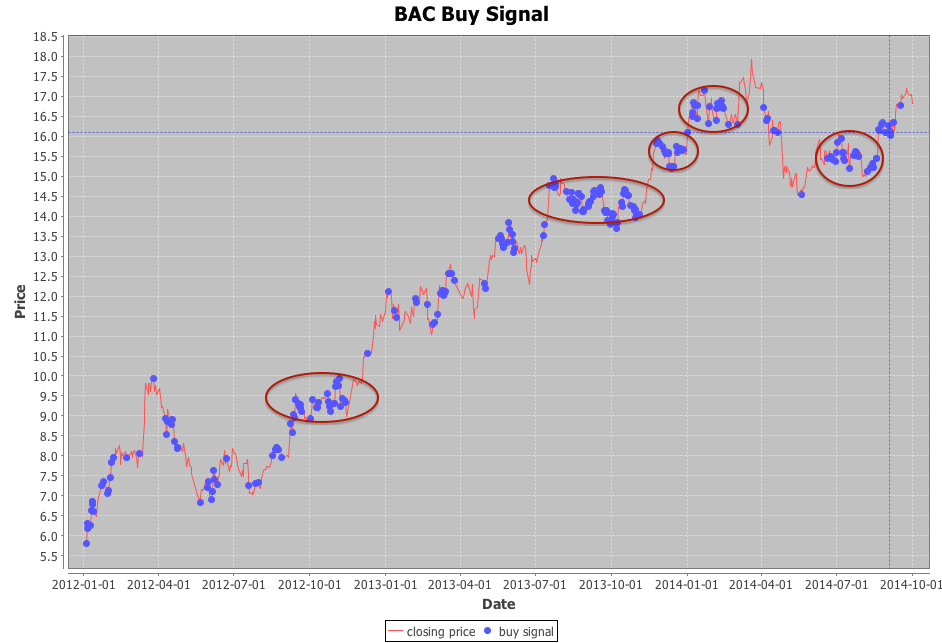
Over the last weekend, I spent some hours tuning and enhancing my new prediction model for stock BAC. The result is quite promising. I still need to do more experiments before replacing my existing model on http://giantify.collective2.com/
Stay tuned for more infos.
Take a look at the following chart, you can see some clusters of buy signals generated before the peak.
You can check out my stock prediction model at
http://giantify.collective2.com/
Stock Clustering Part I
When come to building a well balanced stock portfolio, it is desired to have different mixture of stocks, potentially from different sectors to minimize the risk. Clustering is a great tool to discover these different types of clusters. You can use different features to categorize these stocks, eg. historical prices, returns, etc.
I know I could have used python or R to run the clustering. But as a big data explorer, I decided to use Mahout and Spark to do the job. I will post my findings and experiences of using these tools in the upcoming posts.
Here are the initial clusters found using the pre-clustering canopy algorithm in Mahout to determine the initial number of K clusters. I will perform the K-Means clustering algorithm next.
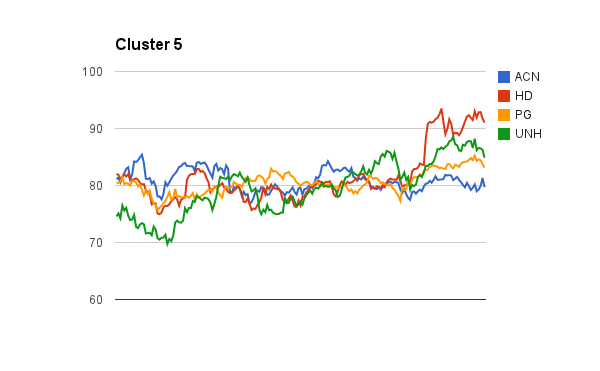
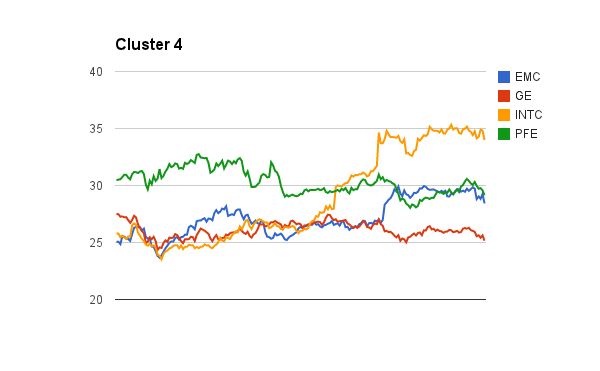


The tedious part of using Mahout clustering is you have to transform your data into sequence file format of mahout vector writables. I will share my codes soon.
Please check out my stock prediction model too 🙂 http://giantify.collective2.com/
To be continued…
Managing Big Data Pipeline using Oozie
If your team is building a big data pipeline to ingest data all the way to data processing/analytics, it is crucial to use something like Oozie to manage the entire workflow. Without a workflow management, it is difficult to manage and monitor the data pipeline. It will be prone to error and mismanagement. Without Oozie, you will most likely fall back to use shell scripting and cron to trigger, run and monitor each individual step, eg Hive query, MapReduce job, pre and post validation steps etc. Writing/maintaining these scripts is a cumbersome task. Soon enough, if you are not careful, the data pipeline turns against you and becomes this unmanageable and unwieldy monster. I have recently overhauled a complex data pipeline and also built new ones to use Oozie as the workflow manager and the difference is like day and night. Not only it allows us to piece together and coordinate different processing steps easily, it also makes the flow super easy to explain to others (eg. Developer, QA, Product Owner). The built in email notification action allows us to detect error every step along the pipeline and notify the appropriate team in charge. In addition, it is easy to parameterize various arguments passed to your job.
You can even build pre and post validation actions to perform simple sanity check of your input and output, eg. making sure your Hive output table or output files is not empty to a full blown abnormality detection pipeline.
In summary, workflow management tool like Oozie allows
1) Easy orchestration and coordination of complex data pipeline consists of hive query, java map reduce job, pig, sqoop and shell scripts.
2) Easy configurability of various processing steps. Eg. Use job.properties to configure and parameterize arguments.
3) Monitoring of complex pipeline. Trigger email notification if error do happen.
Oozie is not without any pain point but it is an essential tool for building and managing a robust data pipeline.
Oozie is a web application built on top of Apache Tomcat Catalina. Take a look at its web.xml and you can find the servlet listener called org.apache.oozie.servlet.ServicesLoader that initializes the Oozie’s services.
<listener>
<listener-class>org.apache.oozie.servlet.ServicesLoader</listener-class>
</listener>


<?xml version="1.0" encoding="UTF-8"?>
<!--
  Licensed to the Apache Software Foundation (ASF) under one
  or more contributor license agreements.  See the NOTICE file
  distributed with this work for additional information
  regarding copyright ownership.  The ASF licenses this file
  to you under the Apache License, Version 2.0 (the
  "License"); you may not use this file except in compliance
  with the License.  You may obtain a copy of the License at

       http://www.apache.org/licenses/LICENSE-2.0

  Unless required by applicable law or agreed to in writing, software
  distributed under the License is distributed on an "AS IS" BASIS,
  WITHOUT WARRANTIES OR CONDITIONS OF ANY KIND, either express or implied.
  See the License for the specific language governing permissions and
  limitations under the License.
-->
<!DOCTYPE web-app PUBLIC "-//Sun Microsystems, Inc.//DTD Web Application 2.3//EN" "http://java.sun.com/dtd/web-app_2_3.dtd" [
    <!ENTITY web-common SYSTEM "web-common.xml">
]>

<web-app>

    <!--
      ========================================================================
      IMPORTANT: ANY CHANGES TO THE SERVLETS, SERVLET MAPPINGS, LISTENERS, ETC
                 MUST BE REFLECTED IN distro/src/main/tomcat/ssl-web.xml
                 AS WELL.
      ========================================================================
    -->

    <display-name>OOZIE</display-name>

    <!-- Listeners -->
    <listener>
        <listener-class>org.apache.oozie.servlet.ServicesLoader</listener-class>
    </listener>

    <!-- Servlets -->
    <servlet>
        <servlet-name>versions</servlet-name>
        <display-name>WS API for Workflow Instances</display-name>
        <servlet-class>org.apache.oozie.servlet.VersionServlet</servlet-class>
        <load-on-startup>1</load-on-startup>
    </servlet>

    <servlet>
        <servlet-name>v0admin</servlet-name>
        <display-name>Oozie admin</display-name>
        <servlet-class>org.apache.oozie.servlet.V0AdminServlet</servlet-class>
        <load-on-startup>1</load-on-startup>
    </servlet>

    <servlet>
        <servlet-name>v1admin</servlet-name>
        <display-name>Oozie admin</display-name>
        <servlet-class>org.apache.oozie.servlet.V1AdminServlet</servlet-class>
        <load-on-startup>1</load-on-startup>
    </servlet>

    <servlet>
        <servlet-name>v2admin</servlet-name>
        <display-name>Oozie admin</display-name>
        <servlet-class>org.apache.oozie.servlet.V2AdminServlet</servlet-class>
        <load-on-startup>1</load-on-startup>
    </servlet>

    <servlet>
        <servlet-name>callback</servlet-name>
        <display-name>Callback Notification</display-name>
        <servlet-class>org.apache.oozie.servlet.CallbackServlet</servlet-class>
        <load-on-startup>1</load-on-startup>
    </servlet>

    <servlet>
        <servlet-name>v0jobs</servlet-name>
        <display-name>WS API for Workflow Jobs</display-name>
        <servlet-class>org.apache.oozie.servlet.V0JobsServlet</servlet-class>
        <load-on-startup>1</load-on-startup>
    </servlet>

    <servlet>
        <servlet-name>v1jobs</servlet-name>
        <display-name>WS API for Workflow Jobs</display-name>
        <servlet-class>org.apache.oozie.servlet.V1JobsServlet</servlet-class>
        <load-on-startup>1</load-on-startup>
    </servlet>

    <servlet>
        <servlet-name>v0job</servlet-name>
        <display-name>WS API for a specific Workflow Job</display-name>
        <servlet-class>org.apache.oozie.servlet.V0JobServlet</servlet-class>
        <load-on-startup>1</load-on-startup>
    </servlet>

    <servlet>
        <servlet-name>v1job</servlet-name>
        <display-name>WS API for a specific Workflow Job</display-name>
        <servlet-class>org.apache.oozie.servlet.V1JobServlet</servlet-class>
        <load-on-startup>1</load-on-startup>
    </servlet>

    <servlet>
        <servlet-name>v2job</servlet-name>
        <display-name>WS API for a specific Workflow Job</display-name>
        <servlet-class>org.apache.oozie.servlet.V2JobServlet</servlet-class>
        <load-on-startup>1</load-on-startup>
    </servlet>

    <servlet>
        <servlet-name>sla-event</servlet-name>
        <display-name>WS API for specific SLA Events</display-name>
        <servlet-class>org.apache.oozie.servlet.SLAServlet</servlet-class>
        <load-on-startup>1</load-on-startup>
    </servlet>

    <servlet>
        <servlet-name>v2sla</servlet-name>
        <display-name>WS API for specific SLA Events</display-name>
        <servlet-class>org.apache.oozie.servlet.V2SLAServlet</servlet-class>
        <load-on-startup>1</load-on-startup>
    </servlet>

    <!-- servlet-mapping -->
    <servlet-mapping>
        <servlet-name>versions</servlet-name>
        <url-pattern>/versions</url-pattern>
    </servlet-mapping>

    <servlet-mapping>
        <servlet-name>v0admin</servlet-name>
        <url-pattern>/v0/admin/*</url-pattern>
    </servlet-mapping>

    <servlet-mapping>
        <servlet-name>v1admin</servlet-name>
        <url-pattern>/v1/admin/*</url-pattern>
    </servlet-mapping>

    <servlet-mapping>
        <servlet-name>v2admin</servlet-name>
        <url-pattern>/v2/admin/*</url-pattern>
    </servlet-mapping>

    <servlet-mapping>
        <servlet-name>callback</servlet-name>
        <url-pattern>/callback/*</url-pattern>
    </servlet-mapping>

    <servlet-mapping>
        <servlet-name>v0jobs</servlet-name>
        <url-pattern>/v0/jobs</url-pattern>
    </servlet-mapping>

    <servlet-mapping>
        <servlet-name>v1jobs</servlet-name>
        <url-pattern>/v1/jobs</url-pattern>
    </servlet-mapping>

    <servlet-mapping>
        <servlet-name>v1jobs</servlet-name>
        <url-pattern>/v2/jobs</url-pattern>
    </servlet-mapping>

    <servlet-mapping>
        <servlet-name>v0job</servlet-name>
        <url-pattern>/v0/job/*</url-pattern>
    </servlet-mapping>

    <servlet-mapping>
        <servlet-name>v1job</servlet-name>
        <url-pattern>/v1/job/*</url-pattern>
    </servlet-mapping>

    <servlet-mapping>
        <servlet-name>v2job</servlet-name>
        <url-pattern>/v2/job/*</url-pattern>
    </servlet-mapping>

    <servlet-mapping>
        <servlet-name>sla-event</servlet-name>
        <url-pattern>/v1/sla/*</url-pattern>
    </servlet-mapping>

    <servlet-mapping>
        <servlet-name>v2sla</servlet-name>
        <url-pattern>/v2/sla/*</url-pattern>
    </servlet-mapping>

    <!-- welcome-file -->
    <welcome-file-list>
        <welcome-file>index.jsp</welcome-file>
    </welcome-file-list>

    <filter>
        <filter-name>hostnameFilter</filter-name>
        <filter-class>org.apache.oozie.servlet.HostnameFilter</filter-class>
    </filter>

    <filter>
        <filter-name>authenticationfilter</filter-name>
        <filter-class>org.apache.oozie.servlet.AuthFilter</filter-class>
    </filter>

    <filter-mapping>
        <filter-name>hostnameFilter</filter-name>
        <url-pattern>/*</url-pattern>
    </filter-mapping>

    <filter-mapping>
        <filter-name>authenticationfilter</filter-name>
        <url-pattern>/versions/*</url-pattern>
    </filter-mapping>

    <filter-mapping>
        <filter-name>authenticationfilter</filter-name>
        <url-pattern>/v0/*</url-pattern>
    </filter-mapping>

    <filter-mapping>
        <filter-name>authenticationfilter</filter-name>
        <url-pattern>/v1/*</url-pattern>
    </filter-mapping>

    <filter-mapping>
        <filter-name>authenticationfilter</filter-name>
        <url-pattern>/v2/*</url-pattern>
    </filter-mapping>

    <filter-mapping>
        <filter-name>authenticationfilter</filter-name>
        <url-pattern>/index.jsp</url-pattern>
    </filter-mapping>

    <filter-mapping>
        <filter-name>authenticationfilter</filter-name>
        <url-pattern>/admin/*</url-pattern>
    </filter-mapping>

    <filter-mapping>
        <filter-name>authenticationfilter</filter-name>
        <url-pattern>*.js</url-pattern>
    </filter-mapping>

    <filter-mapping>
        <filter-name>authenticationfilter</filter-name>
        <url-pattern>/ext-2.2/*</url-pattern>
    </filter-mapping>

    <filter-mapping>
        <filter-name>authenticationfilter</filter-name>
        <url-pattern>/docs/*</url-pattern>
    </filter-mapping>

</web-app>
ServicesLoaader implements the ServletContextListener interface. During initialization, it basically creates and initializes the Services singleton instance which will then load all the different services used in Oozie. For example, ActionService, AuthorizationService, ConfigurationService, CoordinatorService, JPAService, and etc.
After the initialization, servlets in the Oozie will be able to use the above created services to fullfill the submitted requests. For example, JsonRestServlet, the base class for Oozie web service API utilizes the InstrumentationService and ProxyUserService.
package org.apache.oozie.servlet;

import org.apache.oozie.service.Services;

import javax.servlet.ServletContextListener;
import javax.servlet.ServletContextEvent;

/**
 * Webapp context listener that initializes Oozie {@link Services}.
 */
public class ServicesLoader implements ServletContextListener {
    private static Services services;
    private static boolean sslEnabled = false;

    /**
     * Initialize Oozie services.
     *
     * @param event context event.
     */
    public void contextInitialized(ServletContextEvent event) {
        try {
            String ssl = event.getServletContext().getInitParameter("ssl.enabled");
            if (ssl != null) {
                sslEnabled = true;
            }

            services = new Services();
            services.init();
        }
        catch (Throwable ex) {
            System.out.println();
            System.out.println("ERROR: Oozie could not be started");
            System.out.println();
            System.out.println("REASON: " + ex.toString());
            System.out.println();
            System.out.println("Stacktrace:");
            System.out.println("-----------------------------------------------------------------");
            ex.printStackTrace(System.out);
            System.out.println("-----------------------------------------------------------------");
            System.out.println();
            System.exit(1);
        }
    }

    /**
     * Destroy Oozie services.
     *
     * @param event context event.
     */
    public void contextDestroyed(ServletContextEvent event) {
        services.destroy();
    }

    public static boolean isSSLEnabled() {
        return sslEnabled;
    }
}
If you would like to take a look at Oozie’s services layer, check out my blog post https://weishungchung.com/2013/11/24/a-look-into-oozie-internals/
 Wei Shung Chung